Alphabetical wedding seating chart, sorted by last name for you
An alphabetical seating chart lists every guest by last name next to their table number, so each person only has to find their own name. Paste your guest list into the free maker, let it seat everyone by your rules, and it sorts the names and prints the A–Z sign for you. No sign-up, and your list never leaves your browser.
Why alphabetical works best for 100+ guests
Guests know their own name, not who else is at their table. On a by-table sign they have to scan every table to find themselves; on an A–Z sign they go straight to their letter and read across to the table number.
That difference grows with the guest list. With 100 or more guests spread over ten or more tables, a by-table sign is a lot of names to read while others wait behind you. An A–Z list also lets several guests look up different letters at the same time.
A by-table layout still looks lovely on an easel and suits smaller weddings. You don’t have to decide up front: the maker prints both from the same plan.
How names are sorted
The maker builds the A–Z list from your seating plan. This is exactly what it does:
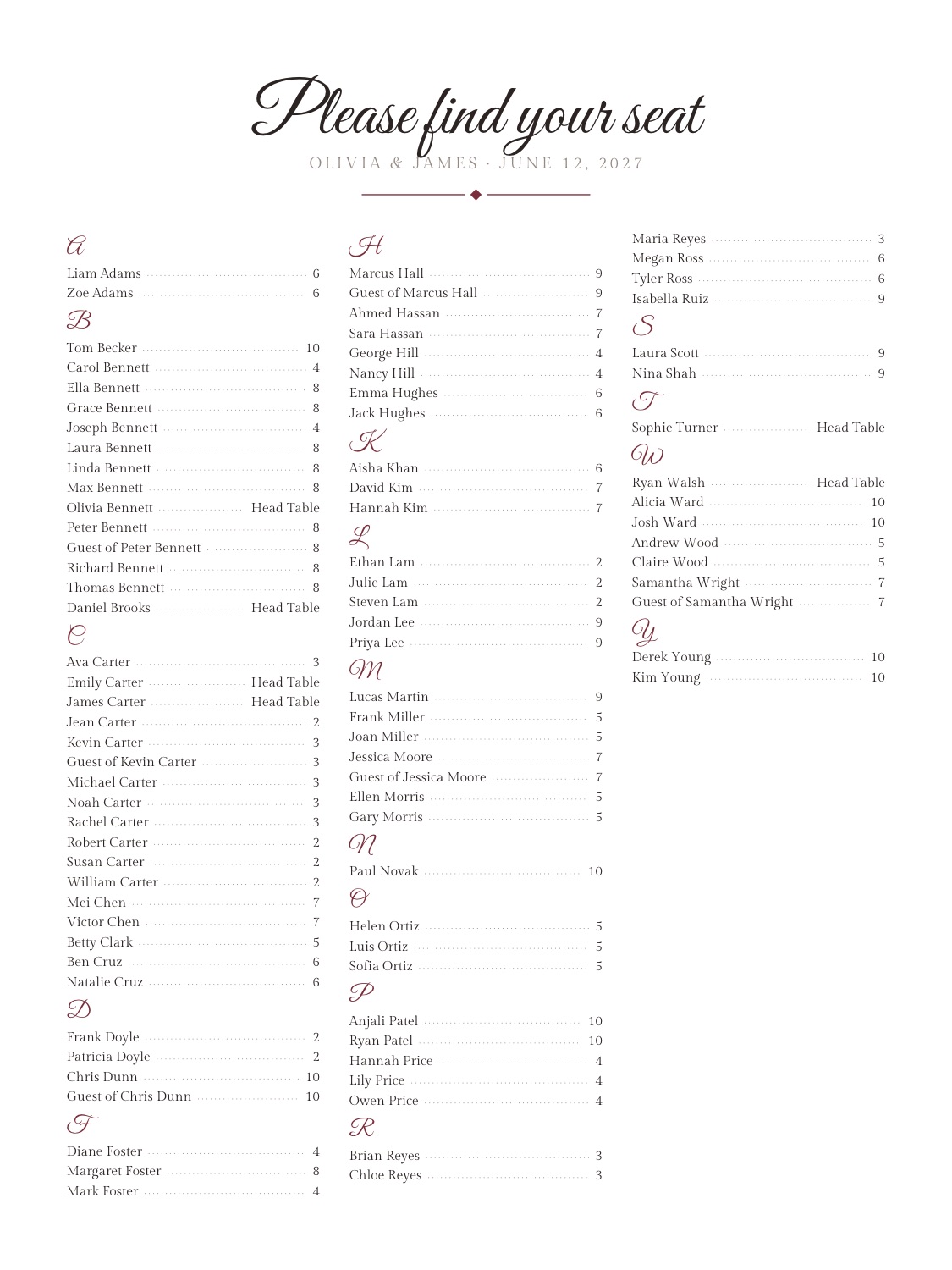
- By last name, then first name. The last word of each name is read as the last name, so Tom Becker comes before Carol Bennett, and Carol Bennett before Ella Bennett. Titles such as Mr., Mrs. or Dr. and endings such as Jr. or III are skipped when sorting. Each letter gets its own heading.
- Accents don’t change the order. Müller files with the Ms and Ødegaard under O.
- Couples and families get one line per person. “Olivia Bennett & James Carter” puts Olivia under B and James under C. Write “John & Jane Smith” and both are listed under S, as John Smith and Jane Smith. A household always shares a table, so everyone in it shows the same table number.
- Plus-ones follow their host. “Peter Bennett +1” prints “Guest of Peter Bennett” right after Peter Bennett, at the same table.
- Chinese names are filed by pinyin. A Chinese name goes under the pinyin initial of the surname (张 under Z), and surnames that are read differently from the everyday reading are corrected (曾 under Z, 单 under S). Within a letter, English names come first. The sign prints the characters themselves.
- The number on the right is the table. The maker takes the number from the table’s name, so Table 3 prints as 3; a table without a number, such as Head Table, prints its full name.
- Only seated guests are listed. Anyone not seated yet is left off, and the maker tells you how many.
How many names fit each sign size
The maker picks the largest type that fits the page and adds columns as needed. These are measured results from our tests (the full table for every size and guest count is on the seating chart sign size page):
- 18 × 24 in poster, A–Z: 150 guests in 4 columns at 15.9 pt. The 90-guest example above is this size.
- 24 × 36 in large poster, by table: 150 guests at 25.1 pt.
- 11 × 17 in tabloid, A–Z: 250 guests still fit, at 9 pt.
When names come out small for the size, the maker notes that they are readable up close but small from a distance, and it already does so for 150 names on 18 × 24 in. If guests will read the sign from a few steps away, or your list is longer, print 24 × 36 in. If a list can’t fit a size at all, the maker says so and suggests a larger size or the by-table layout. The size menu also has 16 × 20 in, A2 and a Letter proof.
Alphabetical or by table?
Both signs come from the same seating plan. Under Print, switch the layout between A–Z by last name and By table, preview each one, and download either or both.
An A–Z list is fastest for guests: they find their own name and see the table number. A by-table layout shows each table’s name with its guests underneath; it looks nicer on an easel and suits smaller weddings. See both printed in the 90-guest example.
Keeping your list in a spreadsheet? The free guest list template pastes straight into the maker.
Alphabetical seating chart questions
How do I make an alphabetical wedding seating chart?
Paste your guest list into the free maker, set your tables and seats, and press Seat everyone. Then, under Print, choose A–Z by last name and a print size, press Preview and download the PDF. The maker sorts the names and fills in the table numbers for you.
Are couples listed together or separately?
Separately. Each guest gets their own line under their own last name, so “Olivia Bennett & James Carter” appear under B and C. A household always shares a table, so both lines show the same table number.
How are plus-ones listed?
Add +1 after a name, for example “Peter Bennett +1”. The sign then lists “Guest of Peter Bennett” right after Peter Bennett, with the same table number.
What size should an alphabetical seating chart be?
18 × 24 in is the common poster size. In our tests 150 guests fit on it in 4 columns at 15.9 pt, which is readable up close but small from a distance. For a longer list, or if guests will read the sign from a few steps away, print 24 × 36 in.
Is it free?
Yes. Auto-seating, editing and the classic A–Z and by-table signs are free, with no account to create, and your guest list stays in your browser. An optional paid print pack adds more sign styles, table number cards and place cards.
Planning from scratch? How to make a wedding seating chart in 7 steps →