Classroom seating arrangements: 9 layouts, with diagrams
How you arrange the desks shapes how a lesson runs: who can see the board, who talks to whom, and how quickly you can reach a student who needs help. Here are nine common classroom seating arrangements, what each one is good for and what to watch out for. Once you’ve picked one, the free classroom seating chart maker seats your class in it, keeping apart the students who shouldn’t sit together.
Choosing a layout
| If the lesson is mostly… | Try |
|---|---|
| Teaching from the front, notes, tests | rows, pairs, exam spacing |
| Partner work and think-pair-share | pairs |
| Small-group projects, labs, stations | pods of four, tables of six |
| Whole-class discussion | U-shape, double U, circle |
| A mix, in a room with fixed rows of space | stadium |
1. Traditional rows
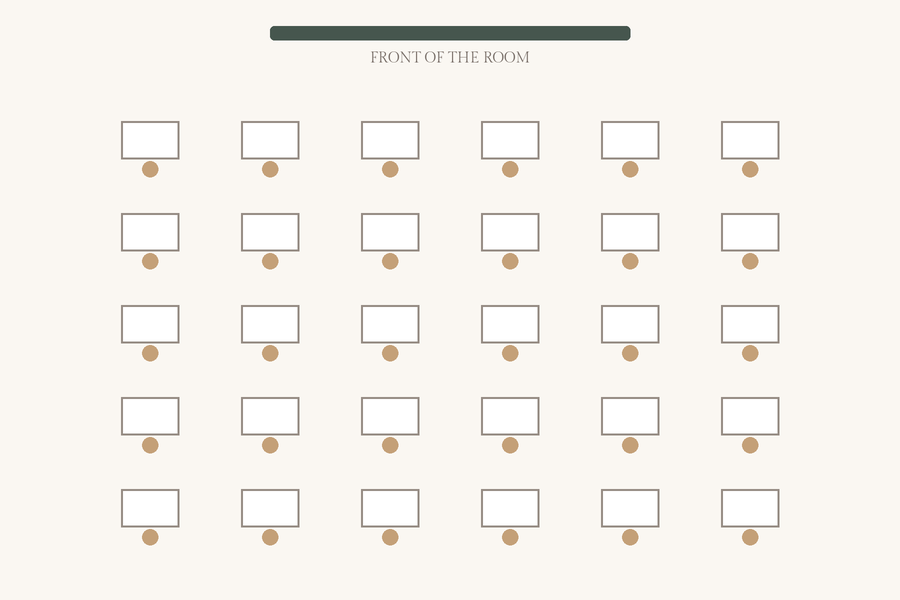
Good for: direct instruction, note-taking and independent work. Every student faces the board, and it is easy to see who is on task.
Watch out for: little room for discussion, and students at the back can drift. It also takes the most floor space per student.
Tip: seat students who need to see or hear well in the front row, and move the back rows forward from time to time.
2. Pairs
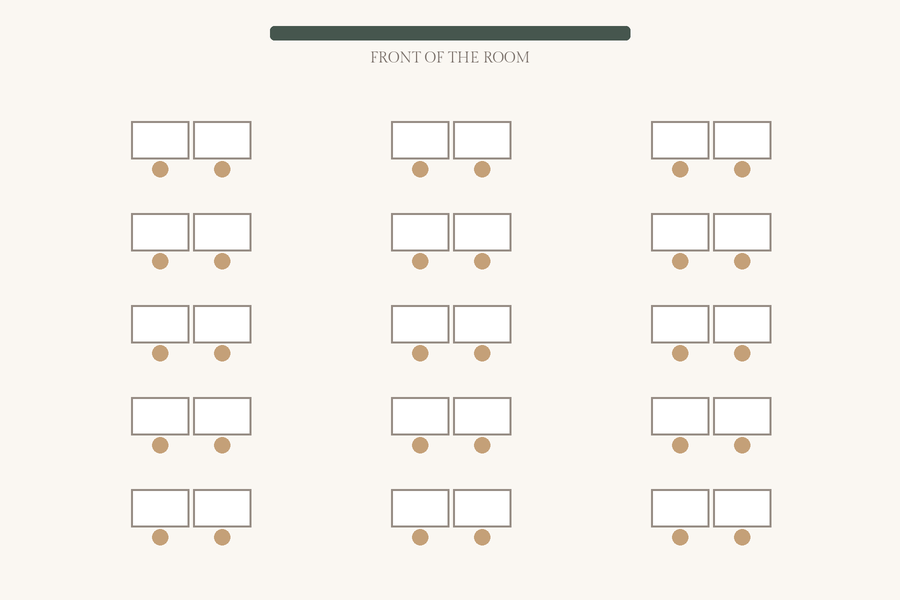
Good for: partner work, think-pair-share and peer checking, while everyone still faces the front. The aisles between pairs let you reach every desk.
Watch out for: a chatty pair can stay chatty all term. Plan who sits with whom, and change partners regularly.
Tip: the seating chart maker’s groups of two give you random partners and keep apart any students you list under “Keep apart”.
Seat my class in 15 pairs → Just need random partners? Random group generator →
3. Pods of four
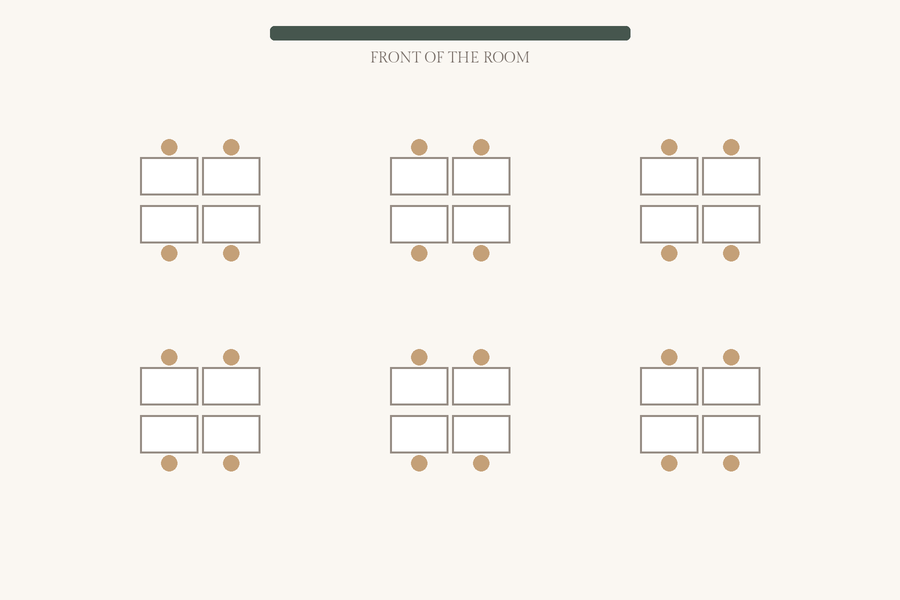
Good for: cooperative learning, discussion in small groups and shared materials. Four is small enough that everyone has a role.
Watch out for: some students sit sideways to the board, and noise rises quickly. Group work needs clear roles and tasks.
Tip: mix each group on purpose, and turn chairs toward the board for whole-class teaching.
4. Tables of six
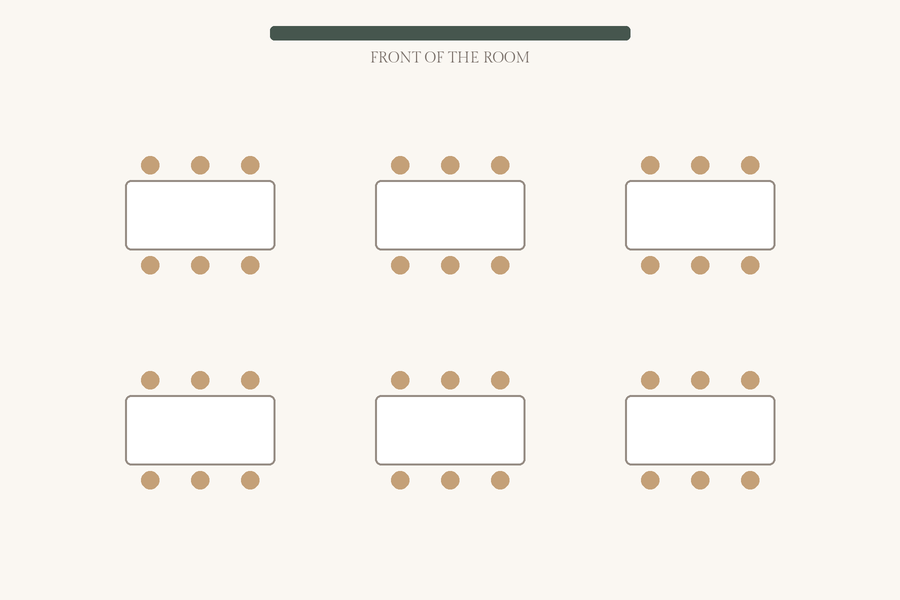
Good for: labs, art, stations and rooms that have tables instead of desks.
Watch out for: groups of six can split into two conversations, and half the students have their backs to the board.
Tip: give each table a number and a job, and seat students who need the board on the side facing it.
5. U-shape (horseshoe)
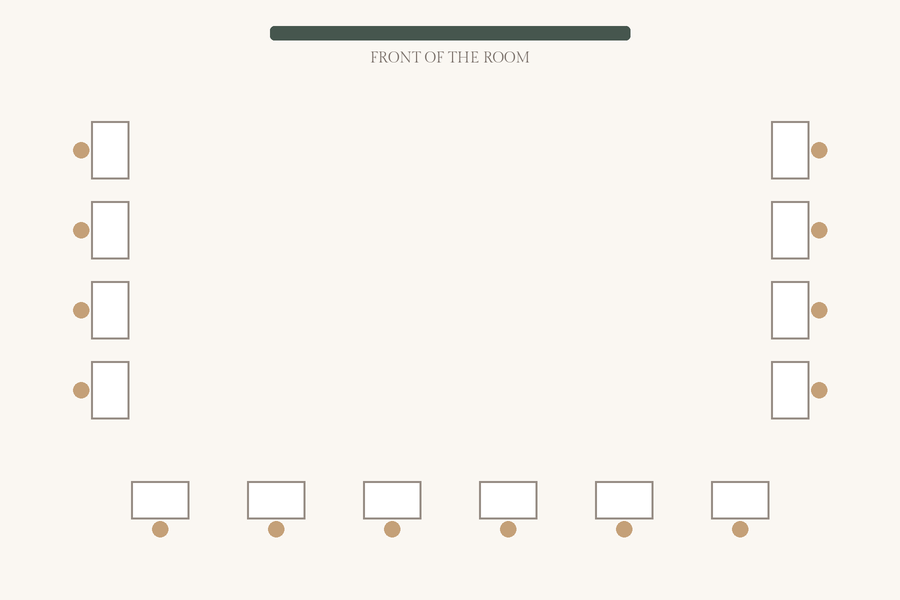
Good for: whole-class discussion and demonstrations. Every student can see the board and each other, and you can walk inside the U to reach any desk.
Watch out for: it seats around 20–24 in a typical room, and the middle of the room goes unused.
Tip: put desks in the open middle for small-group work later, or move to a double U for bigger classes.
The seating chart maker draws rows and groups, not a U-shape yet. For a U, print the class list and place students by hand, or use pairs for a similar mix of sight lines and partner talk.
6. Double U
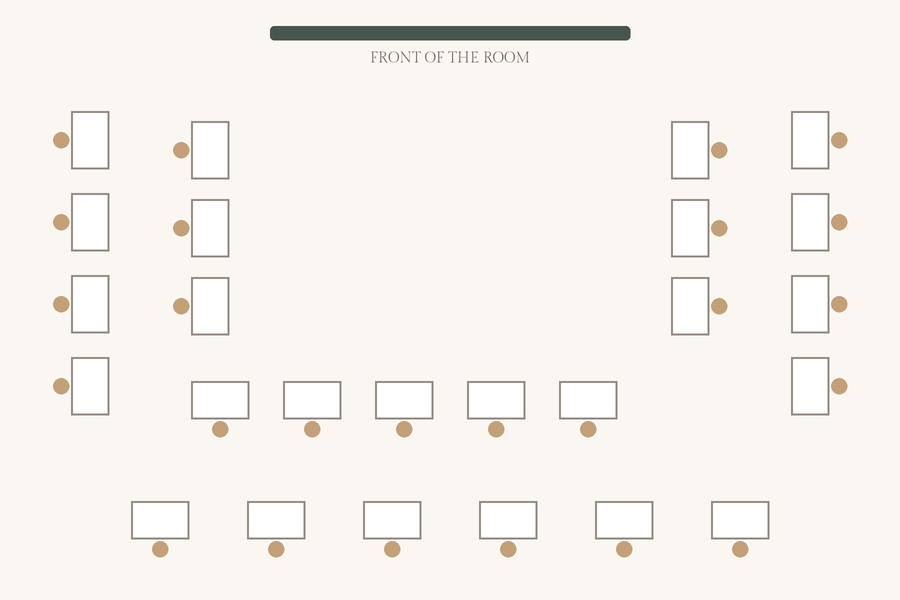
Good for: discussion in larger classes of 30 or more. It keeps most of the U-shape’s sight lines.
Watch out for: the inner U blocks part of the view for the outer one, and the gaps between the rings get tight.
Tip: put students who participate less in the inner U, where they are nearer the conversation.
7. Stadium (chevron)
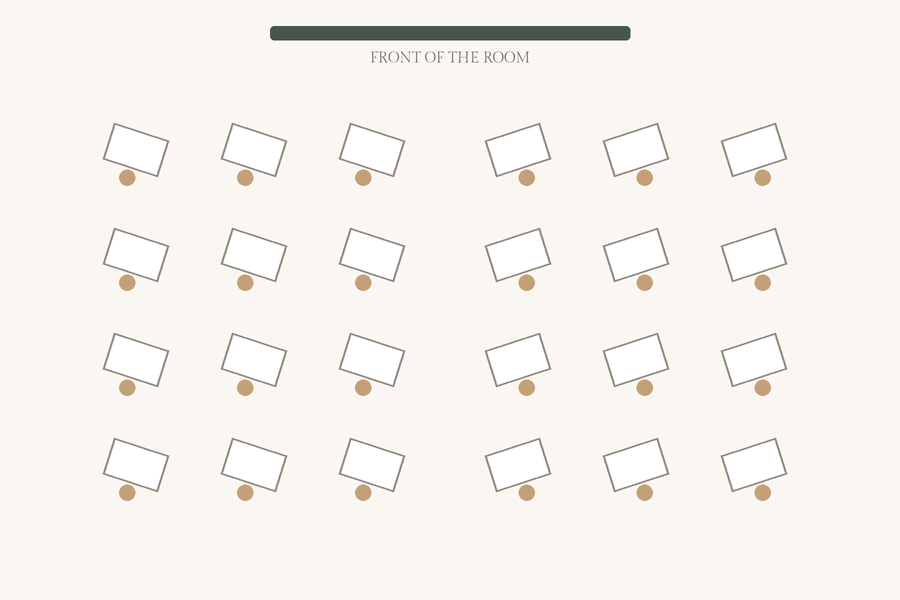
Good for: a middle ground between rows and discussion: students face the front but can see more of their classmates.
Watch out for: angled desks take a bit more space than straight rows.
Tip: plan it as rows in the seating chart maker, then angle the desks on each side toward the middle.
8. Circle (Socratic seminar)
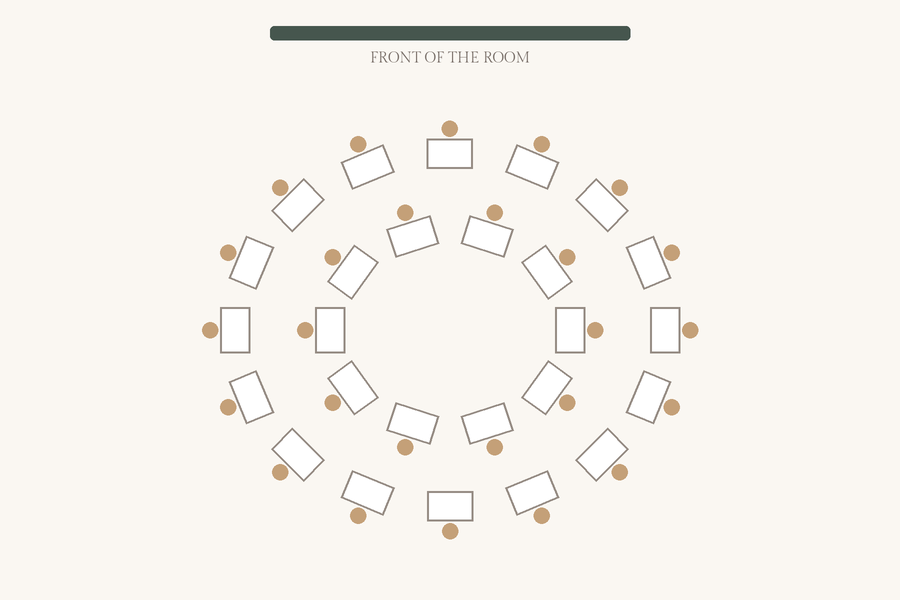
Good for: seminars, debates and class meetings. In an inner and outer circle, the inner circle discusses while the outer circle observes, then they swap.
Watch out for: it usually means moving furniture before and after the lesson.
Tip: split the class into the two circles at random, keeping apart anyone who shouldn’t be in the same circle.
Split the class into two circles with the random group generator →
9. Exam spacing
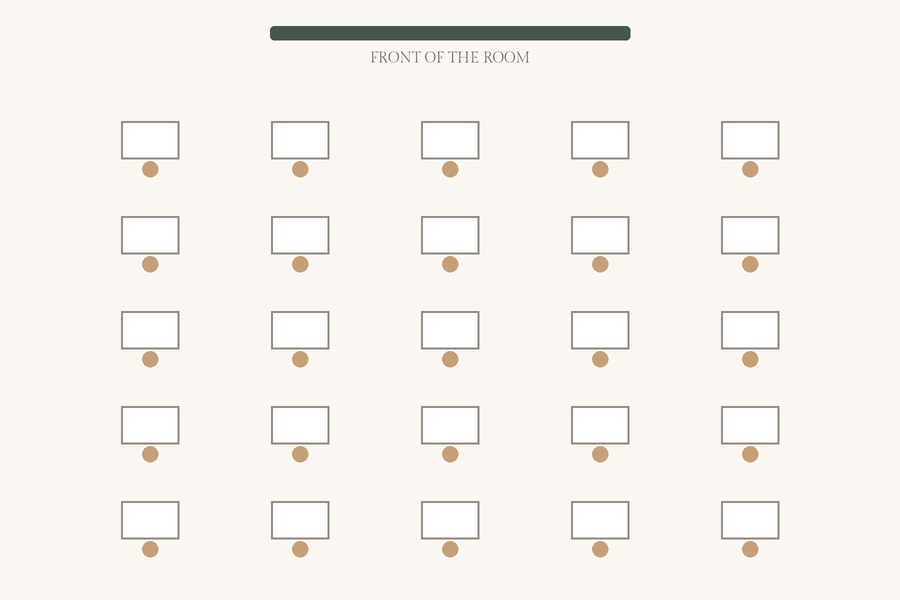
Good for: tests and quizzes, with as much space between desks as the room allows.
Watch out for: it rarely fits a full class in a normal room; you may need fewer desks per row and more rows.
Tip: list students who sit near each other in class under “Keep apart” to separate them for the test, including diagonally.
Making the seating chart
Once the desks are in place, the classroom seating chart maker fills them from your class list in seconds. Mark students who need the front row, list who should be kept apart or seated together, and shuffle until it looks right. Print a one-page chart for your desk or a substitute teacher, or a blank classroom seating chart template to fill in by hand.
Classroom seating arrangement questions
What is the best classroom seating arrangement?
There isn’t one best layout; it depends on what the class is doing. Rows or pairs suit direct teaching and tests, pods and tables suit group work, and a U-shape or circle suits whole-class discussion. Many teachers keep one main layout and move desks for particular activities.
Which seating arrangement is easiest for classroom management?
Rows and pairs make it easiest to see every student and keep attention on the front, and a U-shape lets you walk inside the U and reach every desk quickly. Whatever the layout, a seating chart that keeps certain students apart does more for behavior than the shape of the room.
How often should I change the seating chart?
Many teachers change seats every few weeks, at the start of a unit or after a grading period, so students work with different classmates. A seating chart generator with rules makes a fresh chart in seconds without losing your separations.
How do I keep certain students apart?
In the free classroom seating chart maker, list them under “Keep apart”. In rows they are kept off neighboring desks, including diagonally; in groups they are kept out of the same group. If the room is too tight to keep every rule, the chart marks the ones it couldn’t.
Is there a free classroom seating chart template?
Yes. The classroom seating chart maker prints a blank chart for rows or groups when the class list is empty, or fills in every desk from your class list.